

I was a little annoyed by this Blog performance on Google Search result. Even though I was not intended to rank this Blog very high over a short period but only gradually increases, the fact that Google only includes 2 pages from this blog is disappointing.
I think that was caused by a non-optimized HTML code of this Blog. Now to make this Blog more SEO friendly I started to change the <title> code, because Title is always important for Indexing. Many pages with same title will be treated as one page by Google and that was hurt. Eventually I found a way to solve the problem. Let's do some html var title tricks.
You can modify your template HTML code, and locate this line.<title><data:blog.pageTitle/></title>
Replace with the following code:<!-- Start Widget-based: Changing the Blogger Title Tag -->
<b:if cond='data:blog.pageType == "item"'>
<b:section id='titleTag'>
<b:widget id='Blog2' locked='false' title='Blog Posts' type='Blog'>
<b:includable id='comments' var='post'/>
<b:includable id='postQuickEdit' var='post'/>
<b:includable id='main' var='top'><title><b:loop values='data:posts' var='post'><b:include data='post' name='post'/></b:loop> ~ <data:blog.title/></title></b:includable>
<b:includable id='backlinkDeleteIcon' var='backlink'/>
<b:includable id='feedLinksBody' var='links'/>
<b:includable id='backlinks' var='post'/>
<b:includable id='status-message'/>
<b:includable id='feedLinks'/>
<b:includable id='nextprev'/>
<b:includable id='commentDeleteIcon' var='comment'/>
<b:includable id='post' var='post'><data:post.title/></b:includable>
</b:widget>
</b:section>
<b:else/>
<title><data:blog.pageTitle/></title>
</b:if>
<!-- End Widget-based: Changing the Blogger Title Tag -->
Save and done. You can see the different on your web browser immediately. Now let see, How Google indexing more pages of this Blog. Hopefully the number will increase soon.
Another tips to increase the number of indexed pages of your Blog in Google is published by Amit Agarwal. He said that Blogger may have insert NOINDEX, NOFOLLOW Meta tag in your blog pages silently probably due to a bug.
To remove this buggy meta tag you can do it manually by removing <$BlogMetaData$> (for old Blogger) or <b:include data='blog' name='all-head-content'/> (for new Blogger).
Thanks to Seige and Amit Agarwal for this trick
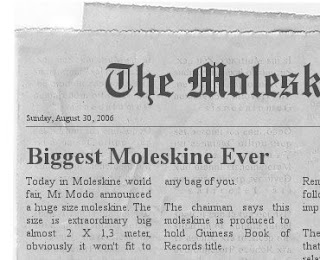
A moleskine that would not fit in your bag, that must be kidding. Yes it's just a kidding nothing in this earth can ask Modo & Modo to produce a huge Moleskine Notebook. But this picture looks nice and if only it's true many Moleskine Notebook owner would be surprised.
It has been 2 weeks after I got my first Moleskine.
I'm using it as my virtually live recorder for almost all of my activity. This habit ate a lot of my moleskine pages.
From the begining, I didn't plan to create something fancy on my black book, I just use it whenever I need. So you couldn't expect my moleskine to be fancy like these pictures :
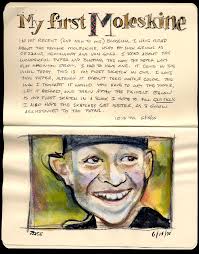 | | |  |
| My First Moleskine! | | | album :: moleskine |
Those are too fancy for me, I can't do that. What my moleskine really done to me is saving my budget. Why is that happend? You know, I am really writing my grocery list right now and take it with me whenever I go shopping. It just made me more dicipline to get away from unnecessary window shopping. Thanks God...
Moleskine, what is that?

A moleskine (pronounced mol-a-skeen-a, /mɔləˈskinə/) is really only a notebook manufactured by Modo & Modo an Italian company. The standard Moleskine Notebook measures 9 x 14cm and features the following: lightweight, acid-free paper, a foldable pocket in the back cover, a cloth ribbon attached to the spine to serve as a bookmark, and a woven elastic band attached to the back to keep the book closed when not in use. When for the first time I saw this black notebooks around two years ago, I didn't interested on it because of it's premium price. Wait a minute... I could buy a cheaper one just for a notebook, but nevertheless I still keep a curiosity somewhere in my mind.
I realized then that my curiosity of this black notebook were growing bigger and stronger and it have convicted me to buy this notebook. Voilà I got a squared moleskine notebook. Then I started to write on it. Hmm its feels good and pretty handy, so I could carry it anywhere in my pocket. I begin to write with my Parker pen, but wait !!... it cannot dry quickly and it blotted to the opposite page. Something must be wrong here. Then I goggled down Internet to solve this problem. I realized that there are many moleskine fans websites with a lot of useful tips for using this premium price notebook. Aha I got it.... so I recite some tips here only for you:
Moleskine Notebook, some tips on using it
- Although the book will fit in a back trouser pocket, if you're going to carry it on your person, it's less damaging to the book to put it in your jacket pocket. (Although the book is light, placing it in a shirt pocket is not recommended.)
- Always use the elastic to keep the pages closed. The pages may be acid-free, but they are not waterproof. Keeping the book closed tightly with the elastic will limit any rain damage to the page edges.
- The ideal writing instrument for the standard size notebook will have a fine point (ie a maximum of 0.7mm). Either pen or pencil will work nicely.
- If you're using the notebook as a creative writing aid, Bruce Chatwin recommended numbering each page for use as a reference guide.
- Chatwin also suggested placing your mailing address in the inside cover, along with notice of a reward for recovery in the event the book gets lost. (The Modo and Modo version provides a space in the inside front cover for this information.)
